Last year I watched a crew in Nigeria pull 4 km of multimode OM3 for a 10 km ISP backbone link. They realized the mistake after the first OTDR reading. The cable had to come out. The rework cost more than the cable itself. That is why I always start with this question: what is the job, and what fiber type actually fits it?
Fiber optic cable is not one product. It is a family of cables built around two core modes—single mode and multimode—and then matched to construction, jacket, and connector choices. Pick the wrong combination and you get signal loss, failed inspections, or budget blowouts. Pick the right one and the link runs for 20 years with almost no maintenance.
In this guide I will walk you through the fiber optic cable types I specify most often, how each construction is built, the standards that matter, and a simple checklist you can use on your next project.

Quick Answer: Single Mode vs Multimode Fiber
If you only remember one thing, remember this:
- Single mode fiber has a small core, about 9 µm. It carries one light path and is built for long distance and high bandwidth.
- Multimode fiber has a larger core, 50 µm or 62.5 µm. It carries multiple light paths and is built for short distance and lower-cost optics.
For carrier backbones, FTTH distribution, and data-center interconnects over 1 km, I default to single mode. For in-building LANs, campus networks, and data-center rack-to-rack links under 550 m, multimode is usually the cheaper choice.
| Feature | Single Mode Fiber | Multimode Fiber |
|---|---|---|
| Core diameter | ~9 µm | 50 µm or 62.5 µm |
| Typical wavelength | 1310 nm / 1550 nm | 850 nm / 1300 nm |
| Light source | Laser | LED or VCSEL |
| Common distance | Tens of km; 100+ km with long-reach optics | Up to 550 m, depending on grade |
| Bandwidth | Very high, speed-limited by optics | Limited by modal dispersion |
| Transceiver cost | Higher | Lower |
| Jacket color | Yellow | Orange (OM1/OM2), Aqua (OM3/OM4), Lime Green (OM5) |
A common myth I hear is that single mode fiber cable is always more expensive. The fiber itself is often close in price. The real cost difference is in the transceivers and splicing equipment. For long links, that difference is tiny compared to the performance gain.
You may also run into plastic optical fiber (POF) in niche consumer and automotive links. It is not glass fiber, we do not specify it for telecom or data center projects, but the name shows up in some RFQs, so it is worth recognizing.
Planning a cable purchase? Send us your fiber count, installation method, and application scenario, and we will recommend a construction with supporting test data. Or keep reading — the sections below build the spec step by step.
Single Mode Fiber Cable Types
Single mode fiber is what I specify for most outdoor, carrier, and FTTH work. The two main commercial grades are OS1 and OS2.
OS1 vs OS2
- OS1 is tight-buffered, designed for indoor use, and typically rated for distances up to 10 km.
- OS2 is loose-tube construction, designed for outdoor and duct deployment, and can reach 100 km or more with long-reach transceivers.
For FTTH feeder cables, metro rings, and long-haul ducts, I almost always use OS2. For indoor trunk runs between floors or data-center rows, OS1 is fine if the distance is short.
ITU-T Standards: G.652.D and G.657.A1/A2
When I read a cable spec sheet, I look for the ITU-T standard:
- ITU-T G.652.D is the standard single mode fiber used in telecom networks. It has low water-peak loss and works across the 1260–1625 nm window.
- G.657.A1 is bend-insensitive fiber with a 10 mm minimum bend radius.
- ITU-T G.657.A2 is more bend-insensitive, with a 7.5 mm minimum bend radius, and is backward compatible with G.652.D.
In FTTH drop cables and indoor wall outlets, G.657.A2 is my default. It survives tight corners inside homes and buildings without the micro-bending loss that kills G.652.D links. In 2026, we standardize on OS2 G.657.A2 for most backbone and FTTH work: bend-insensitive, widely available, and safe against future bandwidth upgrades.
When to Use Single Mode
I specify single mode fiber optic cable when the project needs:
- Distance over 1–2 km
- Future upgrades to 100G, 400G, or 800G
- Carrier or ISP backbone links
- Data-center interconnects between buildings
- Any FTTH network where the feeder and distribution legs are long
Multimode Fiber Cable Types
Multimode fiber is still very common in enterprise and data-center environments. It is simpler to terminate and uses lower-cost transceivers. The grades are OM1, OM2, OM3, OM4, and OM5.
OM1 and OM2: Legacy Grades
- OM1: 62.5 µm core, orange jacket, LED-based. Good for 10 Mbps to 1G at short distances. I avoid it for new builds.
- OM2: 50 µm core, orange jacket. Better than OM1 for 1G and 10G, but still legacy in most of my projects.
If a customer has an old building with OM1/OM2 installed, I only reuse it when the speed and distance requirements are low. Otherwise I recommend a structured upgrade.
OM3, OM4, and OM5: High-Speed Grades
- OM3: Aqua jacket, laser-optimized, supports 10G up to 300 m and 40/100G up to 100 m.
- OM4: Aqua or violet jacket, higher bandwidth, supports 10G up to 550 m and 100G up to 150 m.
- OM5: Lime green jacket, wideband multimode fiber (WBMMF), supports SWDM for 40G/100G/400G.
For new data centers, I specify OM4 as the safe default. OM5 makes sense when the customer is already planning SWDM or wants maximum future-proofing inside the building.
Distance Limits by Speed
When buyers ask about fiber optic cable bandwidth and fiber optic cable speed, they usually mean either the fiber’s effective modal bandwidth (EMB, in MHz·km) or the Ethernet reach at a given data rate. The two are related: higher modal bandwidth supports higher speed over longer distance. Here is how the common grades compare.
| Fiber Grade | EMB @ 850 nm | 1G Ethernet | 10G Ethernet | 40G Ethernet | 100G Ethernet |
|---|---|---|---|---|---|
| OM3 | 2,000 MHz·km | 1000 m | 300 m | 100 m | 100 m |
| OM4 | 4,700 MHz·km | 1000+ m | 550 m | 150 m | 150 m |
| OM5 | 4,700 MHz·km (SWDM capable) | 1000+ m | 550 m | 440 m | 150 m (SWDM) |
These distances follow the common IEEE 802.3 and TIA-568 application tables. I always cross-check the transceiver datasheet because optics from different vendors can vary by 10–20 m. For new data center builds under 400 m, OM4 is usually the safest multimode choice. OS2 single-mode wins whenever the link is longer or the site may scale to 100G/400G later.
Cable Construction: What Is Inside
Mode is only half the story. The cable construction determines where you can install it and how long it will last.
A fiber optic cable is a protected assembly of one or more glass fibers, built in layers so the glass survives pulling, moisture, crushing, and temperature extremes.
I once watched a contractor in Kenya pull the wrong cable into a 2 km duct run. They had specified indoor tight-buffered cable for an outdoor underground link. Six months later, water got in, the jacket cracked, and we were back on site replacing 2,000 meters of fiber. The cable itself was fine — the selection was not. That mistake cost more than the cable: labor, downtime, and the customer’s trust.
Construction Layers: From Glass to Jacket
A fiber optic cable is not just a glass strand in a plastic jacket. Every layer has a job. If you strip one back, you will usually find:
- Optical fiber — the glass core and cladding that carry light
- Buffer coating — protects the fiber from microbending and moisture
- Strength member — FRP or steel wire that carries pulling tension
- Water-blocking material — gel, tape, or dry absorbent powder
- Armoring — steel tape or wire for rodent and crush protection, optional
- Outer jacket — PE for outdoor, PVC or LSZH for indoor
At installation, one rule covers every cable type: keep installed bends to at least 10 times the cable’s outer diameter, and 20 times during pulling. A 12 mm duct cable wants 120 mm of bend clearance. Bend-insensitive fiber like G.657.A2 protects against microbends inside the glass, but it does not excuse tight macro-bends of the whole cable.
The advantages and disadvantages of fiber optic cable come down to matching the right design to the job. Fiber gives higher bandwidth, longer reach, and immunity to EMI compared with copper. The trade-off is careful handling, correct bend radius, and proper jacket selection. Choose the wrong construction and you pay twice: once for the cable, once for the rework.
Loose-Tube Cable
Loose-tube construction places fibers inside gel-filled plastic tubes that run the length of the cable. The fibers have room to move, which reduces stress from temperature swings and pulling. The gel blocks water migration, though dry-core versions are now common and much cleaner to splice.
I use loose-tube cable for outdoor duct, aerial, and direct-burial installations. It handles long pulls and harsh temperatures better than tight-buffered designs:
- Aerial and pole installations
- Duct and conduit pulls
- Direct-buried backbones
- Long-distance ISP links
If the cable will sit in a manhole or underground duct, I also specify water-blocking tape and a rodent-resistant armor layer.
Tight-Buffered Cable
Tight-buffered cable has a plastic layer directly bonded to each fiber. It is more flexible, easier to terminate, and designed for indoor use. I see it in riser runs between floors, data-center patch cords, and indoor distribution in central offices.
It is also the cable we terminate directly — LC or SC connectors with UPC polish, or APC where return loss matters, such as PON drops. The trade-off is mechanical protection: tight-buffered cable is not meant for outdoor pulling or water exposure. Use it inside buildings, inside cabinets, and for short jumper assemblies.
Ribbon Cable
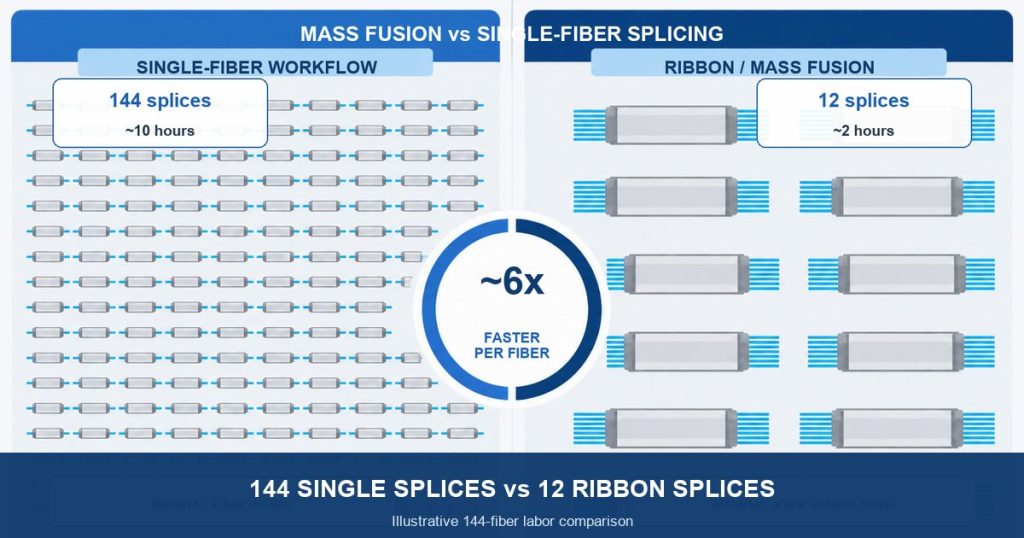
Ribbon cable bonds fibers into flat ribbons, usually 12 fibers per ribbon. It is the fastest cable to splice because you can mass-fuse a whole ribbon at once. I use it for:
- Metro backbone with 144–864 fibers
- Data-center trunk cables
- Any project where splice time is a major cost
The downside is flexibility. Ribbon cable does not like tight bends, so plan your splice closures and routing carefully.
A newer variant, rollable ribbon, bonds the fibers only lightly, so the ribbon rolls up for dense packing but still routes like loose tube. For high-count ducts where space is short, it is worth asking about.
Armored Cable
Armored cable adds a steel or aluminum layer between the cable core and the jacket. It resists rodents, crushing, and accidental digs. I specify these when:
- The cable is buried without conduit
- The route crosses rocky or high-traffic ground
- Rodents are a known problem
I have seen installers cut corners with non-armored cable in rocky direct-burial trenches. Rocks shift, the jacket gets pinched, and six months later the OTDR trace shows a fresh fault. In Africa and Southeast Asia, I see rodent damage on unarmored cables within the first two years. The small extra cost of armor pays for itself.
FTTH Drop Cable
FTTH drop cable is small, light, and designed for the last few meters into a home or building. Common types include:
- Flat drop cable: easy to staple along walls for indoor routing
- Figure-8 drop cable: includes a built-in messenger for aerial spans
- Bend-insensitive drop cable: uses G.657.A2 fiber so it can follow corners and baseboards without excessive loss
- Composite (hybrid) drop cable: adds copper power conductors under the same jacket, so an ONU on a pole or facade can be powered without a separate electrical run
The drop cable connects to the customer premises through a fiber wall socket. I always match the drop cable fiber grade to the indoor outlet so there is no mode mismatch at the customer end. For a real deployment example, see our FTTH rollout case study.
Jacket Ratings and Safety Codes
The jacket is not just a color. It determines where the cable can legally be installed and how it behaves in a fire.
| Rating | Full Name | Best For | Why It Matters |
|---|---|---|---|
| PE | Polyethylene | Outdoor aerial, duct, burial | Good UV and moisture resistance |
| PVC | Polyvinyl chloride | Indoor general use | Low cost, flexible, but toxic smoke |
| LSZH | Low-smoke zero-halogen | Public buildings, ships, tunnels, data centers | Less toxic smoke in a fire |
| OFNR | Optical fiber non-conductive riser | Vertical shafts between floors | Minimum rating for indoor riser runs |
| OFNP | Optical fiber non-conductive plenum | Plenum air spaces, raised floors | Highest fire rating for North America |
I specify LSZH for any indoor public infrastructure project. In a fire, PVC releases corrosive halogen gas that can destroy electronics and block evacuation. LSZH produces far less smoke and no halogen acid.
For EU projects, also check the CPR EuroClass printed on the datasheet (EN 50575). Public buildings and transit projects often require B2ca or Cca; a generic “LSZH” claim does not replace the printed class.
Cable Types by Application
Indoor Cables
Indoor cables must meet fire codes. Look for riser-rated or plenum-rated jackets, and specify LSZH in public buildings. Common indoor constructions include:
- Distribution cable — many tight-buffered fibers in one jacket
- Breakout cable — individual subcables around a central strength member
- Zipcord — two-fiber duplex cable for patch cords and short links
Simplex means one fiber — used for one-way links or bidirectional-over-WDM. Duplex pairs two fibers for simultaneous transmit and receive, which is what standard Ethernet and Fiber Channel transceivers expect.
Outdoor Aerial Cables
Aerial cables hang on poles or building facades. They must survive wind, ice, UV, and tension. The main types are:
| Cable Type | Key Feature | Best For |
|---|---|---|
| Figure-8 self-supporting | Built-in steel messenger | Standard telecom poles |
| ADSS | All-dielectric self-supporting | Long spans, near power lines |
| ASU mini | Compact dielectric self-support | FTTH last-mile drops |
| OPGW | Optical fibers inside ground wire | High-voltage power lines |
I like ADSS for long rural spans because it has no metal and does not need electrical grounding. Near high-voltage lines, it is often the safest choice. For ordinary FTTH drops on wooden poles, figure-8 cable is cheaper and faster to install.
Underground and Direct-Burial Cables
Underground cable runs through buried conduit. Direct-burial cable goes straight into the soil. Both need water blocking, crush resistance, and sometimes armor. For underground ducts, I prefer loose-tube cable with a pulling eye or properly taped bundle. For direct burial, I use armored cable or lay standard cable inside HDPE conduit. The conduit adds cost but makes future replacement much easier.
There is one more option: microcables blown into HDPE microducts. A microduct bundle installed once can take several microcables added over the years as capacity grows. For cities and campus networks where fiber demand grows in steps, this usually beats pulling ever-larger loose-tube cable every time. We size the microduct bundle for the final fiber count, then blow in what the project needs today.
Quotes from Asian factories often use letter model codes for outside-plant cable. Four cover most projects: GYTS (stranded loose-tube, steel-tape armored — ducts and direct burial), GYTA (loose-tube, aluminum-tape armored — ducts and burial), GYXTW (central loose-tube with steel tape — short-haul aerial and duct), and GYTA53 (double jacket, steel tape plus steel wire — harsh direct burial). The code describes armor and jacket, not the fiber: the fiber grade (G.652.D, G.657.A2) is specified in the same model string, so read both halves.
Submarine cable is a specialty of its own, with heavy double armor for water pressure and seabed abrasion. Few generalist suppliers stock it, so if a route crosses a river, harbor, or coastal link, treat it as a separate procurement.
Data Center Cables
Data centers need density and speed. We use pre-terminated MPO/MTP trunk cables for 40G, 100G, and 400G links. For shorter 10G/25G links, duplex LC patch cords with OM4 or OM5 multimode fiber are common.
Single-mode OS2 is gaining ground in hyperscale data centers because it supports longer reaches and future-proofing. The choice between single-mode and multimode in a data center depends on the switch port cost and the link distance.
Fiber Optic Cable Standards Every Buyer Should Know
Standards are what let a buyer in Dubai, a contractor in Lagos, and a factory in Shenzhen read the same spec sheet and expect the same result. The most common references are ITU-T for fiber classes, IEC for cable construction and testing, and TIA/ISO for premises cabling.
| Standard / Body | What It Covers | Why It Matters |
|---|---|---|
| ITU-T G.652.D | Single-mode fiber for general use | The baseline OS2 fiber in most outside-plant projects |
| ITU-T G.657.A1/A2 | Bend-insensitive single-mode fiber | G.657.A2 is the default for FTTH drop and indoor routing |
| IEC 60794 | Optical fiber cable specifications and test methods | Defines tensile, crush, bend, temperature, and water-blocking tests |
| IEC 60332 / 60754 / 61034 | Flame retardance, halogen acid gas, smoke density | Validates LSZH and fire-rated jackets |
| TIA-568 | Structured cabling for commercial buildings | North American premises cabling reference |
| ISO/IEC 11801 | Generic cabling for customer premises | International equivalent of TIA-568 |
When you ask a supplier for a quote, request a datasheet that cites the relevant standards. For an FTTH ODN (optical distribution network) build, that usually means IEC 60794 and ITU-T G.652.D or G.657.A2. For a data center link, add ISO/IEC 11801 or TIA-568 to the list.
Typical Attenuation Values
| Fiber / Cable | Wavelength | Typical Attenuation |
|---|---|---|
| OS2 single-mode | 1310 nm | ~0.35 dB/km |
| OS2 single-mode | 1550 nm | ~0.20 dB/km |
| OM3 multimode | 850 nm | ~2.3 dB/km |
| OM4 multimode | 850 nm | ~2.0 dB/km |
Cable attenuation is only half of the link budget — connectors and splices add the rest, and they are where acceptance testing earns its keep. As working acceptance criteria, I hold suppliers to:
| Point | Insertion Loss | Return Loss |
|---|---|---|
| Fusion splice | 0.05 dB typical, 0.1 dB max | — |
| Connector pair, UPC | 0.1 dB typical, 0.3 dB max | 50 dB or better |
| Connector pair, APC | 0.1 dB typical, 0.3 dB max | 60 dB or better |
A result worse than these numbers means a dirty end-face or a bad splice, not a bad fiber — clean, re-splice, and retest before blaming the cable.
These are typical values. Always check the supplier’s test report, because cable quality, installation, and splices all affect the real link budget.
Unsure which of these standards your project actually needs? Our engineers review specs and test plans with buyers before quoting — ask us.
How to Choose the Right Fiber Optic Cable
Here is the checklist I use when I spec a cable. I run through it on every project, even small ones.
Step 1: Define the Distance and Speed
Write down the link length and the data rate. If the link is over 1 km or may upgrade to 100G+, single mode is usually the answer. If it is under 550 m and stays at 10G/25G/40G/100G inside a building, multimode OM4 is probably fine.
Step 2: Pick the Environment
Indoor, outdoor, aerial, buried, or underwater? Each needs a different construction. Outdoor links need UV and moisture protection. Indoor links need fire-rated jackets. Buried links need armor or conduit. If the route crosses rocky ground, roads, or rodent territory, specify armored cable or add conduit from the start.
Step 3: Match the Connector and Polish
- LC: small form factor, data center default
- SC: push-pull, common in telecom and FTTH
- ST: bayonet, older installs
- MPO/MTP: multi-fiber, 40G/100G/400G parallel optics
- E2000 / DIN: European legacy and high-power plant — expect them on older European networks, not new builds
- UPC polish: blue, general use, low back reflection
- APC polish: green, very low back reflection, the standard choice for PON and required for RF video
Never mix UPC and APC connectors in the same link. The 8-degree angled end-face on APC will not mate correctly with a flat UPC connector.
Step 4: Check Standards and Certifications
I always ask the supplier for test reports against ITU-T, IEC, and Telcordia standards. For outdoor cables, I look for water-blocking, tensile strength, and temperature cycle test data — the IEC 60794 series defines exactly these tests. After installation, I re-test every splice and connector against the design loss budget before handover.
Step 5: Plan for Future Growth
Installers love to optimize for today’s budget. I force myself to ask: will this cable still work in 10 years? If the customer may upgrade speeds, I add spare fiber count or step up to single mode even if multimode is cheaper today.
Common Mistakes to Avoid
- Mixing single mode and multimode: the 9 µm vs 50/62.5 µm core mismatch causes massive loss.
- Using indoor cable outdoors: the jacket will crack under UV and water exposure. It is the single most common rework job I get called for.
- Ignoring bend radius: G.657.A2 helps, but every cable has a minimum bend radius. Violate it and you add loss.
- Skipping the strength member check: long pulls need a proper strength member and pulling lubricant.
- Mixing OM grades: do not splice OM3 to OM4 unless you account for the mode-field mismatch.
- Forgetting the jacket rating: installing PVC in a plenum space can fail fire inspection.
- Under-ordering fiber count: pulling a second cable later is always more expensive than adding spare fibers now.
- Buying on price alone: unit cost is one line item. Rework, downtime, and replacement are the real cost drivers.

Fiber Optic Cable Applications Summary
| Application | Typical Cable | Fiber Type |
|---|---|---|
| ISP / telecom backbone | Loose-tube armored duct | OS2 |
| FTTH distribution | Loose-tube, microduct, ribbon | OS2 G.657.A2 |
| FTTH drop | Flat or round drop cable | OS2 G.657.A2 |
| Data center trunk | MPO/MTP pre-terminated | OM4/OM5 or OS2 |
| Enterprise LAN | Tight-buffered distribution | OM4 or OS2 |
| Aerial | ADSS, figure-8, ASU | OS2 |
| Direct burial | Armored loose-tube | OS2 |
| Power utility | OPGW, ADSS | OS2 |
| Mobile fronthaul (FTTA) | Ruggedized armored patch cords | OS2 |
| Industrial / military | Ruggedized armored | OS2 |
What to Ask a Supplier Before Ordering
Before you ask for a price, gather the information a supplier actually needs. This checklist saves you both time and prevents mismatches.
| Item | Why It Matters |
|---|---|
| Fiber count and spare fibers | Determines cable size and cost |
| Fiber type (OS2 / OM3 / OM4 / OM5) | Matches distance and bandwidth needs |
| Existing plant compatibility (connector, polish, fiber grade) | New cable must mate with what is already installed; mixing UPC/APC or OM grades creates loss |
| Installation method and environment | Drives construction and jacket choice |
| Tensile strength and pulling length | Long pulls need a proper strength member |
| Drum length and packaging | Sets splice count, pulling plan, and freight cost |
| Jacket / fire rating (PE / PVC / LSZH / OFNP / OFNR) | Code compliance and environmental protection |
| Armor or conduit requirement | Mechanical protection for direct burial or industrial zones |
| Operating temperature range | Outdoor plant is typically rated −40 °C to +70 °C; confirm the range for extreme climates (desert, high altitude) |
| Standards compliance (ITU-T / IEC / TIA / ISO) | Spec-sheet baseline and acceptance criteria |
| Test reports (OTDR, IL/RL) | Verifies attenuation and splice quality |
| Samples and delivery schedule | Confirms quality and project timeline |
Prefer a head start? Request a fiber optic cable specification sheet and tell us your project type — we will return the checklist pre-filled with standard constructions, test data, and lead time.
At BWNFiber, we usually ask for this same list before quoting. It helps us recommend the right construction and avoid the kind of field failure I described at the start.
How to Compare Fiber Optic Cable Suppliers
Once you have two or three quotes against the same checklist, they are finally comparable. I score suppliers on five things before I talk price:
Test data with the quote — a supplier who attaches OTDR traces and IL/RL reports without being asked usually runs a tighter factory. A quote with no data is a quote with no proof.
Willingness to say no — if a factory questions your fiber count, armor choice, or drum length, that is engineering engagement, not sales friction. The cheapest quote that never asks a question is often the riskiest one.
Production transparency — ask who draws the fiber and who builds the cable. Some suppliers manufacture; some resell. Both can work, but you should know which one you are buying from.
Lead time honesty — a realistic 25 days beats a promised 15 that slips to 30. Ask what happens to the delivery schedule if the cable fails final test, and who pays for the re-test.
After-sales behavior — for project orders, ask how the supplier handles a failed OTDR acceptance test at site. That answer predicts your project risk better than the price list.
Price and payment terms matter, but they are the output of this comparison, not the input.
Regional and Export Considerations
Spec language and cable habits vary by market. The fiber physics does not, but the paperwork and the failure modes do:
| Market | What Changes in Practice |
|---|---|
| North America | OFNP/OFNR fire ratings per the local electrical code; TIA-568 labeling; UL-listed components expected on inspected jobs |
| Europe | CPR EuroClass (B2ca/Cca) on every datasheet; ISO/IEC 11801 language; CE documentation; E2000 connectors on legacy carrier plant |
| Middle East | Extreme UV and heat: carbon-black PE jacket and a verified −40 °C to +70 °C range; LSZH in tunnels and public buildings; long desert spans favor ADSS |
| Southeast Asia | Monsoon humidity and flooded ducts: dry water-blocked loose tube; rodent armor outside city cores; duct and microduct builds that grow in stages |
| Africa | Long rural aerial spans (ADSS or figure-8); rodent and theft exposure favors armored burial in towns; plan consolidated sea-freight lead time |
| Latin America | A mix of US and EU standards by country — confirm which system the project specification cites before quoting |
For any export order, four document sets belong in the shipment: the commercial invoice and packing list, the certificate of origin, the per-drum OTDR and IL/RL test reports, and the standards compliance statement. For OEM/ODM programs, agree on jacket print artwork, reel labeling language, and third-party inspection (SGS or Bureau Veritas) before production, not after.
When to Ask for a Customized Cable Design
Standard constructions cover most projects. Four situations push me toward a custom design instead:
- Unusual fiber counts — 18, 36, or 60 fibers do not match standard tube layouts. A custom build avoids paying for empty positions you will never light.
- Harsh or mixed routes — rodent-heavy rocky soil, high-tension aerial spans, or a route that shifts from duct to direct burial halfway. One cable can be built for the worst section instead of splicing two types.
- Pre-connectorized drops — factory-terminated drop cable cuts splicing time on large FTTH rollouts. The trade-off is stricter pulling planning, because you cannot cut and re-terminate on site.
- Private-label (OEM/ODM) programs — distributors and integrators often need their own jacket print, packaging, and documents. This is routine for export factories, but agree on artwork and test-report format before production, not after.
The trigger is simple: when the catalog option forces a compromise on fiber count, installation method, or termination, ask for the custom design before you compromise the project.
Frequently Asked Questions
Q: What are the two main types of fiber optic cable?
A: Single mode fiber and multimode fiber. Single mode has a ~9 µm core and is used for long-distance, high-speed links. Multimode has a 50 µm or 62.5 µm core and is used for short-distance, lower-cost links.
Q: What is the difference between OS1 and OS2?
A: OS1 is usually tight-buffered indoor cable with higher attenuation, around 1.0 dB/km. OS2 is low-water-peak single-mode fiber, typically loose-tube, with attenuation around 0.35 dB/km at 1310 nm. For outdoor and long-distance work, use OS2.
Q: Can I use multimode fiber for FTTH?
A: Generally no. FTTH distribution networks usually run several kilometers and use PON split ratios, which exceed multimode limits. Single mode OS2 is the standard for FTTH.
Q: What does the jacket color mean?
A: Yellow is single mode. Orange is OM1/OM2 multimode. Aqua is OM3/OM4. Lime green is OM5. These colors follow TIA-598 and help technicians avoid mistakes on site.
Q: Is single mode fiber always more expensive than multimode?
A: Not necessarily. The fiber cost is often similar. The bigger difference is transceiver cost. For long links, single mode is usually cheaper overall because it avoids amplification and future upgrades.
Q: Which fiber optic cable should I use in a data center?
A: For rack-to-rack links under 150 m at 100G, OM4 multimode is cost-effective. For data-center interconnects between buildings, use OS2 single mode.
Q: What type of fiber optic cable is best for outdoor use?
A: For aerial routes, ADSS or figure-8 self-supporting cable in OS2. For ducts, gel-free loose-tube cable. For direct burial, armored loose-tube cable, or standard loose-tube inside HDPE conduit. The common thread is water blocking, a UV-stable PE jacket, and OS2 single-mode fiber.
Q: What is the difference between ADSS and OPGW?
A: ADSS is a self-supporting all-dielectric cable that hangs on its own strength member, usually on distribution poles. OPGW carries fibers inside a ground wire strung on high-voltage transmission towers. ADSS fits telecom and FTTH aerial routes; OPGW is built for power utilities that want fiber along their transmission lines.
Q: What does LSZH mean?
A: Low-smoke zero-halogen. LSZH jackets produce less smoke and no halogen gases when burned. We specify LSZH for indoor public spaces, ships, tunnels, and data centers.
Q: What is the advantage of ribbon cable?
A: Ribbon cable allows mass fusion splicing, which is much faster than single-fiber splicing. It shines in high-density central offices, data centers, and large FTTH hubs.
Q: What is the difference between loose-tube and tight-buffered cable?
A: Loose-tube cable has fibers inside protective tubes with gel or dry water-blocking. It is for outdoor, long-distance, and harsh conditions. Tight-buffered cable has plastic directly bonded to each fiber and is for indoor, flexible, short links.
Q: How do I choose between OM3, OM4, and OM5?
A: For new data center links under 400 m, OM4 is the common choice. OM5 adds SWDM support for future short-reach wavelengths. OM3 is acceptable for shorter legacy upgrades.
Q: What attenuation should I expect from OS2 single-mode cable?
A: Typical OS2 attenuation is about 0.35 dB/km at 1310 nm and about 0.20 dB/km at 1550 nm. Always verify with the supplier’s test report.
Q: Why is G.657.A2 fiber preferred for FTTH drops?
A: G.657.A2 is bend-insensitive. It can route around corners and baseboards with less extra loss, which matters in homes and small buildings.
Q: What documents should I request from a fiber cable supplier?
A: Ask for a datasheet, standards compliance statement, OTDR test report, insertion loss / return loss report, and sample reel if possible.
Q: Can I mix single-mode and multimode cables in one network?
A: Only with a media converter or mode-conditioning patch cord. Directly connecting single-mode to multimode causes severe loss because the core sizes and light sources do not match.
Q: How far can a fiber optic cable run without losing signal?
A: It depends on the grade and the optics, not just the glass. Multimode tops out at 300–550 m depending on speed. OS2 single-mode runs tens of kilometers on standard transceivers and 100 km or more with long-reach optics or amplifiers. The practical limit is the link budget: fiber attenuation plus every connector and splice along the route.
Related Reading
- Fiber Optic Cable Testing, Installation & Loss Budget Guide
- Single Mode vs Multimode Fiber: OM3/OM4/OS1/OS2 Explained
- FTTH Drop Cable & Aerial/Underground Fiber Cable Guide
- Fiber Optic Splice Sleeve: The Complete Buying & Specification Guide
- Armored, ADSS & OPGW Fiber Optic Cable Guide

Looking for Fiber Optic Cable for Your Project?
At BWNFiber we supply the full range of fiber optic cable types I covered above, including:
- OS2 single mode loose-tube cable for outdoor ISP and FTTH backbone
- G.657.A2 bend-insensitive drop cable for last-mile FTTH
- OM3/OM4/OM5 multimode cable for data-center and enterprise LAN
- Armored direct-burial and ADSS aerial cable for harsh environments
- Tight-buffered indoor cable with LSZH, OFNR, and OFNP jacket options
We also provide matching connectivity products such as fiber optic splitters and fiber wall sockets so the full link uses the same fiber grade and connector polish.
For project orders, our engineers review the route plan, link budget, and acceptance criteria with your team before production. Bulk orders ship with full OTDR and IL/RL test documentation for customs clearance and site acceptance, and we support OEM and private-label programs with custom jacket print and packaging.
Every cable is tested for insertion loss, return loss, and geometry before shipment. Send us your fiber count, installation method, and application scenario, and we will reply with a recommended cable construction, supporting test data, and a quote.
📧 [email protected]
📞 +86-13615744790 (WhatsApp)
🌐 Request a fiber cable sample or quote →
This guide is for internal planning and customer education. Data based on ITU-T, IEC, TIA-568, and field experience as of 2026-09-01. Not investment or legal advice.
BWNFiber · Business Intelligence Excellence